1 - Testing a Plugin
Guidelines for testing Plugins contributed to the Greenhouse project.
Overview
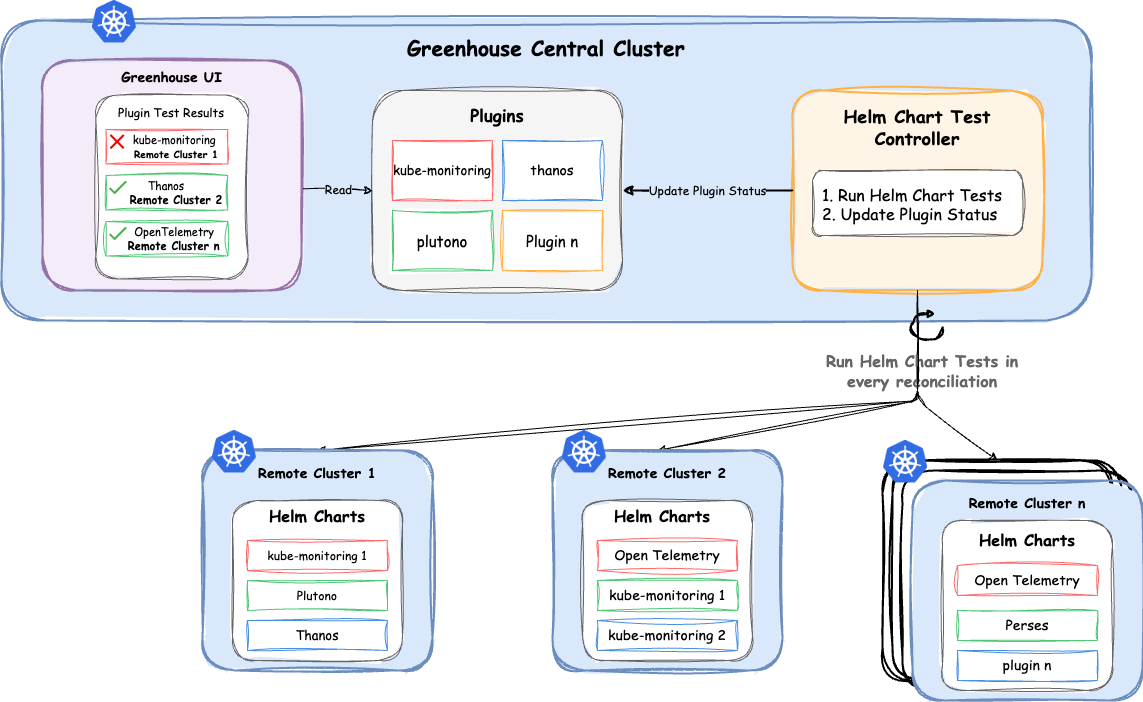
Plugin Testing Requirements
All Plugins contributed to Plugin-Extensions repository should include comprehensive Helm Chart Tests using the bats/bats-detik testing framework. This ensures our Plugins are robust, deployable, and catch potential issues early in the development cycle.
What is bats/bats-detik?
The bats/bats-detik framework simplifies end-to-end (e2e) Testing in Kubernetes. It combines the Bash Automated Testing System (bats) with Kubernetes-specific assertions (detik). This allows you to write test cases using natural language-like syntax, making your tests easier to read and maintain.
Implementing Tests
Create a /tests folder inside your Plugin’s Helm Chart templates folder to store your test resources.
ConfigMap definition:
- Create a
test-<plugin-name>-config.yaml file in the templates/tests directory to define a ConfigMap that will hold your test script. - This
ConfigMap contains the test script run.sh that will be executed by the test Pod to run your tests.
{{- if .Values.testFramework.enabled -}}
apiVersion: v1
kind: ConfigMap
metadata:
  name: {{ .Release.Name }}-test
  namespace: {{ .Release.Namespace }}
  labels:
    type: integration-test
data:
  run.sh: |-

    #!/usr/bin/env bats

    load "/usr/lib/bats/bats-detik/utils"
    load "/usr/lib/bats/bats-detik/detik"

    DETIK_CLIENT_NAME="kubectl"

    @test "Verify successful deployment and running status of the {{ .Release.Name }}-operator pod" {
        verify "there is 1 deployment named '{{ .Release.Name }}-operator'"
        verify "there is 1 service named '{{ .Release.Name }}-operator'"
        try "at most 2 times every 5s to get pods named '{{ .Release.Name }}-operator' and verify that '.status.phase' is 'running'"
    }

    @test "Verify successful creation and bound status of {{ .Release.Name }} persistent volume claims" {
        try "at most 3 times every 5s to get persistentvolumeclaims named '{{ .Release.Name }}.*' and verify that '.status.phase' is 'Bound'"
    }

    @test "Verify successful creation and available replicas of {{ .Release.Name }} Prometheus resource" {
        try "at most 3 times every 5s to get prometheuses named '{{ .Release.Name }}' and verify that '.status.availableReplicas' is more than '0'"
    }

    @test "Verify creation of required custom resource definitions (CRDs) for {{ .Release.Name }}" {
        verify "there is 1 customresourcedefinition named 'prometheuses'"
        verify "there is 1 customresourcedefinition named 'podmonitors'"
    }
{{- end -}}
Note: You can use this guide for reference when writing your test assertions.
Test Pod Definition:
- Create a
test-<plugin-name>.yaml file in the templates/tests directory to define a Pod that will run your tests. - This test
Pod will mount the ConfigMap created in the previous step and will execute the test script run.sh.
{{- if .Values.testFramework.enabled -}}
apiVersion: v1
kind: Pod
metadata:
  name: {{ .Release.Name }}-test
  namespace: {{ .Release.Namespace }}
  labels:
    type: integration-test
  annotations:
    "helm.sh/hook": test
    "helm.sh/hook-delete-policy": "before-hook-creation,hook-succeeded"
spec:
  serviceAccountName: {{ .Release.Name }}-test
  containers:
    - name: bats-test
      image: "{{ .Values.testFramework.image.registry}}/{{ .Values.testFramework.image.repository}}:{{ .Values.testFramework.image.tag }}"
      imagePullPolicy: {{ .Values.testFramework.image.pullPolicy }}
      command: ["bats", "-t", "/tests/run.sh"]
      volumeMounts:
        - name: tests
          mountPath: /tests
          readOnly: true   volumes:
    - name: tests
      configMap:
        name: {{ .Release.Name }}-test
  restartPolicy: Never
{{- end -}}
- RBAC Permissions:
- Create the necessary RBAC resources in the
templates/tests folder with a dedicated ServiceAccount and role authorisations so that the test Pod can cover test the cases. - You can use test-permissions.yaml from the
kube-monitoring as a reference to configure RBAC permissions for your test Pod.
- Configure the Test Framework in Plugin’s
values.yaml:- Add the following configuration to your Plugin’s
values.yaml file:
testFramework:
  enabled: true
  image:
    registry: ghcr.io
    repository: cloudoperators/greenhouse-extensions-integration-test
    tag: main
  imagePullPolicy: IfNotPresent
- Running the Tests:
Important: Once you have completed all the steps above, you are ready to run the tests. However, before running the tests, ensure that you perform a fresh Helm installation or upgrade of your Plugin’s Helm release against your test Kubernetes cluster (for example, Minikube or Kind) by executing the following command:
# For a new installation
helm install <Release name> <chart-path>

# For an upgrade
helm upgrade <Release name> <chart-path>
- After the Helm installation or upgrade is successful, run the tests against the same test Kubernetes Cluster by executing the following command.
Plugin Testing with dependencies during Pull Requests
Overview
Some Plugins require other Plugins to be installed in the Cluster for their tests to run successfully. To support this, each Plugin can declare required dependencies using a test-dependencies.yaml file.
The test-dependencies.yaml file is required if other Plugins need to be installed in the Kind Cluster created by the GitHub Actions workflow before running tests during a Pull Request for the Plugin.
How It Works
- Each Plugin can optionally include a
test-dependencies.yaml file in the Plugin’s root directory (e.g., Thanos/test-dependencies.yaml). - This file defines both the dependencies (other Plugins) that should be installed before testing begins and custom values for these dependencies.
Example test-dependencies.yaml
dependencies:
  - kube-monitoring
values:
  kubeMonitoring:
    prometheus:
      enabled: true
      serviceMonitor:
        enabled: false
      prometheusSpec:
        thanos:
          objectStorageConfig:
            secret:
              type: FILESYSTEM
              config:
                directory: "/test"
              prefix: ""
In this example, the Plugin:
- Declares
kube-monitoring as a dependency that must be installed first - Provides custom values for this dependent Plugin, specifically configuring Prometheus settings
Dependency Structure
The test-dependencies.yaml file supports:
- dependencies: A list of Plugin names that should be installed before testing the current Plugin.
- values: Custom configuration values to be applied when installing dependencies
Automation during Pull Requests
The GitHub Actions workflow automatically:
- Detects Plugins that are changed in the Pull Request.
- Parses the
test-dependencies.yaml for each changed Plugin if present. - Installs listed dependencies in order
- Proceeds with Helm Chart linting and testing
Testing Values Configuration
Parent Plugin Configuration
- A Plugin may optionally provide a
<plugin-name>/ci/test-values.yaml file - The GitHub Actions workflow will use this values file for testing the Plugin if it exists
- This allows you to customize values specifically for CI testing, without modifying the default
values.yaml
Dependent Plugin Configuration
- Values for dependent Plugins should be specified in the values section of your Plugin’s
test-dependencies.yaml file. - This allows you to customize the configuration of dependent Plugins when they are installed for testing.
- The values specified in the
test-dependencies.yaml file will override the default values of the dependent Plugins.
Example File Structure:
alert/
├── charts/
├── ci/
│   └── test-values.yaml
└── test-dependencies.yaml
Contribution Checklist
Before submitting a Pull Request:
- Ensure your Plugin’s Helm Chart includes a
/tests directory. - Verify the presence of
test-<plugin-name>.yaml, test-<plugin-name>-config.yaml, and test-permissions.yaml files. - Test your Plugin thoroughly using
helm test <release-name> and confirm that all tests pass against a test Kubernetes Cluster. - Include a brief description of the tests in your Pull Request.
- Make sure that your Plugin’s Chart Directory and the Plugin’s Upstream Chart Repository are added to this Greenhouse-Extensions Helm Test Config File. This will ensure that your Plugin’s tests are automatically run in the GitHub Actions workflow when you submit a Pull Request for this Plugin.
- Note that the dependencies of your Plugin’s Helm Chart might also have their own tests. If so, ensure that the tests of the dependencies are also passing.
- If your Plugin relies on other Plugins for testing, please follow the Plugin Testing with Dependencies section for declaring those dependencies.
Important Notes
- Test Coverage: Aim for comprehensive test coverage to ensure your Plugin’s reliability.
Next Steps
2 - Plugin deployment
Deploy a Greenhouse plugin to an existing Kubernetes cluster.
Before you begin
This guides describes how to configure and deploy a Greenhouse plugin.
apiVersion: greenhouse.sap/v1alpha1
kind: Plugin
metadata:
  name: kube-monitoring-martin
  namespace: <organization namespace> # same namespace in remote cluster for resources
spec:
  clusterName: <name of the remote cluster >
  disabled: false
  displayName: <any human readable name>
  pluginDefinition: <pluginDefinition name>
  releaseNamespace: <namespace> # namespace in remote cluster where the plugin is deployed
  releaseName: <helm release name> # name of the helm release that will be created
  optionValues:
    - name: <from the plugin options>
      value: <from the plugin options>
    - ...
Exposed services and ingresses
Plugins deploying Helm Charts into remote clusters support exposing their services and ingresses in two ways:
Service exposure via service-proxy
Services can be exposed through Greenhouse’s central service-proxy by adding this annotation:
annotations:
  greenhouse.sap/expose: "true"
For services with multiple ports, you can specify which port to expose:
annotations:
  greenhouse.sap/expose: "true"
  greenhouse.sap/exposed-named-port: "https"  # optional, defaults to first port
Direct ingress exposure
Ingresses can be exposed directly using their external URLs:
annotations:
  greenhouse.sap/expose: "true"
  greenhouse.sap/exposed-host: "api.example.com"  # optional, for multi-host ingresses
Both types of exposures appear in the Plugin’s status.exposedServices with different types: service or ingress.
Deploying a Plugin
Create the Plugin resource via the command:
kubectl --namespace=<organization name> create -f plugin.yaml
After deployment
Check with kubectl --namespace=<organization name> get plugin has been properly created. When all components of the plugin are successfully created, the plugin should show the state configured.
Check in the remote cluster that all plugin resources are created in the organization namespace.
URLs for exposed services and ingresses
After deploying the plugin to a remote cluster, the ExposedServices section in Plugin’s status provides an overview of the exposed resources. It maps URLs to both services and ingresses found in the manifest.
Service-proxy URLs (for services)
- Services exposed through service-proxy use the pattern:
https://$cluster--$hash.$organization.$basedomain - The
$hash is computed from service--$namespace
Direct ingress URLs (for ingresses)
- Ingresses are exposed using their actual hostnames:
https://api.example.com or http://internal.service.com - Protocol (http/https) is automatically detected from the ingress TLS configuration
- The host is taken from
greenhouse.sap/exposed-host annotation or defaults to the first host rule
Both types are listed together in status.exposedServices with their respective types for easy identification.
Next Steps
3 - Managing Plugins for multiple clusters
Deploy a Greenhouse Plugin with the same configuration into multiple clusters.
Managing Plugins for multiple clusters
This guide describes how to configure and deploy a Greenhouse Plugin with the same configuration into multiple clusters.
The PluginPreset resource is used to create and deploy Plugins with a the identical configuration into multiple clusters. The list of clusters the Plugins will be deployed to is determind by a LabelSelector.
As a result, whenever a cluster, that matches the ClusterSelector is onboarded or offboarded, the Controller for the PluginPresets will take care of the Plugin Lifecycle. This means creating or deleting the Plugin for the respective cluster.
The same validation applies to the PluginPreset as to the Plugin for immutable fields (e.g. ReleaseNamespace). A PluginPreset can be created even if the referenced (Cluster-)PluginDefinition does not yet exist - the PluginPreset will be admitted and the controller will reflect the missing definition via a PluginFailed condition with reason PluginDefinitionNotFound. Once the PluginDefinition is created, the controller will automatically reconcile and create the managed Plugins.
In case the PluginPreset is updated all of the Plugin instances that are managed by the PluginPreset will be updated as well. Each Plugin instance that is created from a PluginPreset has a label greenhouse.sap/pluginpreset: <PluginPreset name>. Also the name of the Plugin follows the scheme <PluginPreset name>-<cluster name>.
Changes that are done directly on a Plugin which was created from a PluginPreset will be overwritten immediately by the PluginPreset Controller. All changes must be performed on the PluginPreset itself.
If a Plugin already existed with the same name as the PluginPreset would create, this Plugin will be ignored in following reconciliations.
Example PluginPreset
apiVersion: greenhouse.sap/v1alpha1
kind: PluginPreset
metadata:
  name: kube-monitoring-preset
  namespace: <organization namespace>
spec:
  plugin: # this embeds the PluginSpec
    displayName: <any human readable name>
    pluginDefinition: <PluginDefinition name> # k get plugindefinition
    releaseNamespace: <namespace> # namespace where the plugin is deployed to on the remote cluster. Will be created if not exists
    optionValues:
      - name: <from the PluginDefinition options>
        value: <from the PluginDefinition options>
      - ..
  clusterSelector: # LabelSelector for the clusters the Plugin should be deployed to
    matchLabels:
      <label-key>: <label-value>
  clusterOptionOverrides: # allows you to override specific options in a given cluster
    - clusterName: <cluster name where we want to override values>
      overrides:
        - name: <option name to override>
          value: <new value>
        - ..
    - ..
See Writing a PluginPreset Spec for more details on how to configure a PluginPreset.
Next Steps
4 - Using Metadata Labels and CEL Expressions
Use cluster metadata labels and CEL expressions to create dynamic Plugin configurations.
Overview
Greenhouse allows you to define metadata labels on Clusters and use them in PluginPreset configurations through CEL (Common Expression Language) expressions. This enables dynamic configuration of Plugins based on cluster-specific attributes like region, environment, or any custom metadata.
For information on setting metadata labels on Clusters, see Setting Metadata Labels.
Prerequisites
The feature flag pluginPreset.expressionEvaluationEnabled must be enabled in your Greenhouse installation. It is off by default, see Feature Flags.
Using Expressions with PluginPresets
Expressions can be used in the optionValues of a PluginPreset to deploy Plugins to multiple clusters with cluster-specific configurations:
apiVersion: greenhouse.sap/v1alpha1
kind: PluginPreset
metadata:
  name: monitoring-preset
  namespace: example-organization
spec:
  clusterSelector:
    matchLabels:
      metadata.greenhouse.sap/tier: premium
  plugin:
    pluginDefinitionRef:
      kind: PluginDefinition
      name: kube-monitoring
    releaseNamespace: monitoring
    optionValues:
      - name: kubeMonitoring.prometheus.ingress.enabled
        value: true
      - name: kubeMonitoring.prometheus.ingress.hosts
        expression: |
          - prometheus.${global.greenhouse.clusterName}.example.com
      - name: global.commonLabels
        expression: |
          cluster: ${global.greenhouse.clusterName}
          region: ${global.greenhouse.metadata.region}
          environment: ${global.greenhouse.metadata.environment}
This PluginPreset will:
- Select all clusters with the
metadata.greenhouse.sap/tier: premium label - Create a Plugin for each matching cluster
- Resolve expressions using each cluster’s specific metadata
The Plugin created for a cluster named cluster-a with the labels metadata.greenhouse.sap/region: eu-de-1 and metadata.greenhouse.sap/environment: production contains the resolved values:
spec:
  optionValues:
    - name: kubeMonitoring.prometheus.ingress.enabled
      value: true
    - name: kubeMonitoring.prometheus.ingress.hosts
      value:
        - prometheus.cluster-a.example.com
    - name: global.commonLabels
      value:
        cluster: cluster-a
        region: eu-de-1
        environment: production
See CEL Expressions in OptionValues for more details.
Available Variables
The following global.greenhouse.* variables are available in expressions:
| Variable | Description |
|---|
global.greenhouse.clusterName | The name of the target cluster |
global.greenhouse.organizationName | The name of the organization |
global.greenhouse.baseDomain | DNS base domain for Greenhouse |
global.greenhouse.ownedBy | The owning team of the Plugin |
global.greenhouse.metadata.* | Cluster metadata labels |
⚠️ global.greenhouse.clusterNames and global.greenhouse.teamNames were removed. An expression still referencing either of them fails to evaluate and blocks the PluginPreset from rolling out its Plugins. See Injected Greenhouse Values.
Using CEL Functions
CEL string functions can transform values:
optionValues:
  # Convert to uppercase
  - name: clusterLabel
    expression: ${global.greenhouse.clusterName.upperAscii()}

  # Split and rejoin with different delimiter
  - name: normalizedName
    expression: ${global.greenhouse.clusterName.split('-').join('_')}

  # Check if environment contains a substring
  - name: isProduction
    expression: ${global.greenhouse.metadata.environment.contains('prod')}
For a complete list of available CEL string functions, see the CEL string extension documentation.
Next Steps
5 - Plugin Catalog
Explore the catalog of Greenhouse PluginDefinitions
Before you begin
This guides describes how to explore the catalog of Greenhouse PluginDefinitions.
While all members of an organization can see the Plugin catalog, enabling, disabling and configuration PluginDefinitions for an organization requires organization admin privileges.
Exploring the PluginDefinition catalog
The PluginDefinition resource describes the backend and frontend components as well as mandatory configuration options of a Greenhouse extension.
While the PluginDefinition catalog is managed by the Greenhouse administrators and the respective domain experts, administrators of an organization can configure and tailor Plugins to their specific requirements.
NOTE: The UI also provides a preliminary catalog of Plugins under Organization> Plugin> Add Plugin.
Run the following command to see all available PluginDefinitions.
$ kubectl get plugindefinition

NAME                      VERSION   DESCRIPTION                                                                                                  AGE
cert-manager              1.1.0     Automated certificate management in Kubernetes                                                               182d
digicert-issuer           1.2.0     Extensions to the cert-manager for DigiCert support                                                          182d
disco                     1.0.0     Automated DNS management using the Designate Ingress CNAME operator (DISCO)                                  179d
doop                      1.0.0     Holistic overview on Gatekeeper policies and violations                                                      177d
external-dns              1.0.0     The kubernetes-sigs/external-dns plugin.                                                                     186d
heureka                   1.0.0     Plugin for Heureka, the patch management system.                                                             177d
ingress-nginx             1.1.0     Ingress NGINX controller                                                                                     187d
kube-monitoring           1.0.1     Kubernetes native deployment and management of Prometheus, Alertmanager and related monitoring components.   51d
prometheus-alertmanager   1.0.0     Prometheus alertmanager                                                                                      60d
supernova                 1.0.0     Supernova, the holistic alert management UI                                                                  187d
teams2slack               1.1.0     Manage Slack handles and channels based on Greenhouse teams and their members                                115d
Next Steps
6 - Connecting Plugins with References
Use values of other Plugins in a PluginPreset.
Overview
This guide describes how to use values of other Plugins in a PluginPreset.
An option of a PluginPreset can take its value from another Plugin or PluginPreset in the same namespace with valueFrom.ref. A CEL expression selects the value. Greenhouse resolves the reference for each cluster and writes the result into the generated Plugin as a plain value. When the spec or labels of the referenced Plugin or PluginPreset change, or the status of a referenced Plugin, the value is resolved again.
The guide covers the following cases:
| Case | Description | Example |
|---|
| n:n | Each Plugin reads a value from the other Plugin on the same cluster. | Perses on every cluster gets the ServiceMonitor labels of the Prometheus on the same cluster. |
| 1:n | One Plugin collects a value from multiple Plugins. | A global Thanos Query discovers the Thanos endpoints of all clusters. |
| n:1 | Multiple Plugins read a value from the same Plugin. | The Prometheus on every cluster sends its alerts to one central Alertmanager. |
| m:n | Multiple Plugins each collect a value from a different group of Plugins. | A Thanos Query per domain, such as compute or storage, discovers the Thanos endpoints of the clusters in its domain. |
The examples use the kube-monitoring, perses, thanos and alerts Plugins. They are only examples, references work the same way between any other Plugins.
See ValueFrom References for more details on all fields.
Prerequisites
The feature flags pluginPreset.expressionEvaluationEnabled and pluginPreset.integrationEnabled must be enabled in your Greenhouse installation. Both are off by default, see Feature Flags.
n:n integration
Each Plugin reads a value from the other Plugin on the same cluster. Both are created from PluginPresets deployed to the same clusters, and the reference points to the other PluginPreset.
For example, Perses and Prometheus are deployed to the same clusters. The Prometheus only scrapes ServiceMonitors with certain labels, so the ServiceMonitor of Perses needs these labels.
The kube-monitoring PluginPreset sets the labels the Prometheus selects ServiceMonitors by:
apiVersion: greenhouse.sap/v1alpha1
kind: PluginPreset
metadata:
  name: kube-monitoring
  namespace: example-organization
spec:
  clusterSelector:
    matchLabels:
      cluster-type: observability
  plugin:
    pluginDefinitionRef:
      kind: ClusterPluginDefinition
      name: kube-monitoring
    releaseName: kube-monitoring
    releaseNamespace: kube-monitoring
    optionValues:
      - name: kubeMonitoring.prometheus.prometheusSpec.serviceMonitorSelector
        value:
          matchLabels:
            plugin: kube-monitoring
The perses PluginPreset reads these labels from the kube-monitoring PluginPreset:
apiVersion: greenhouse.sap/v1alpha1
kind: PluginPreset
metadata:
  name: perses
  namespace: example-organization
spec:
  clusterSelector:
    matchLabels:
      cluster-type: observability
  plugin:
    pluginDefinitionRef:
      kind: ClusterPluginDefinition
      name: perses
    releaseName: perses
    releaseNamespace: kube-monitoring
    optionValues:
      - name: perses.serviceMonitor.selfMonitor
        value: true
      - name: perses.serviceMonitor.labels
        valueFrom:
          ref:
            kind: PluginPreset
            name: kube-monitoring
            expression: |
              ${spec.plugin.optionValues.filter(v, v.name == "kubeMonitoring.prometheus.prometheusSpec.serviceMonitorSelector")[0].value.matchLabels}
The Plugin created for each cluster contains the resolved value:
spec:
  optionValues:
    - name: perses.serviceMonitor.selfMonitor
      value: true
    - name: perses.serviceMonitor.labels
      value:
        plugin: kube-monitoring
A reference to a PluginPreset is resolved for each cluster separately. If kube-monitoring sets different labels for a cluster in its clusterOptionOverrides, the Perses on that cluster gets these labels.
Referencing a Plugin instead of a PluginPreset
A reference to a PluginPreset can only read what is set in the PluginPreset. To read from the Plugin on a cluster, for example its status, use kind: Plugin. The name of a Plugin is <PluginPreset name>-<cluster name>, so the reference has to be set for each cluster in clusterOptionOverrides:
spec:
  clusterOptionOverrides:
    - clusterName: obs-eu-de-1
      overrides:
        - name: perses.serviceMonitor.labels
          valueFrom:
            ref:
              kind: Plugin
              name: kube-monitoring-obs-eu-de-1
              expression: |
                ${spec.optionValues.filter(v, v.name == "kubeMonitoring.prometheus.prometheusSpec.serviceMonitorSelector")[0].value.matchLabels}
See What a reference returns for the difference between the two kinds.
1:n integration
A Plugin collects a value from multiple Plugins. The Plugins are selected by their labels, and the results are collected into a list.
For example, a central Thanos Query needs the gRPC endpoint of the Thanos on every cluster.
The thanos-regional PluginPreset deploys Thanos to all clusters with the label cluster-type: observability and exposes its Thanos Query via a gRPC ingress. The host is built from the cluster name:
apiVersion: greenhouse.sap/v1alpha1
kind: PluginPreset
metadata:
  name: thanos-regional
  namespace: example-organization
spec:
  clusterSelector:
    matchLabels:
      cluster-type: observability
  plugin:
    pluginDefinitionRef:
      kind: ClusterPluginDefinition
      name: thanos
    releaseName: thanos
    releaseNamespace: kube-monitoring
    optionValues:
      - name: thanos.query.ingress.grpc.enabled
        value: true
      - name: thanos.query.ingress.grpc.hosts
        expression: |
          - host: thanos-grpc.${global.greenhouse.clusterName}.example.com
            paths:
              - path: /
                pathType: ImplementationSpecific
The thanos-global PluginPreset deploys the central Thanos Query to the cluster obs-eu-de-1. It selects all Plugins created by thanos-regional via the label greenhouse.sap/pluginpreset and reads the host from each of them:
apiVersion: greenhouse.sap/v1alpha1
kind: PluginPreset
metadata:
  name: thanos-global
  namespace: example-organization
spec:
  clusterSelector:
    matchLabels:
      greenhouse.sap/cluster: obs-eu-de-1
  plugin:
    pluginDefinitionRef:
      kind: ClusterPluginDefinition
      name: thanos
    releaseName: thanos-global
    releaseNamespace: kube-monitoring
    optionValues:
      - name: thanos.query.stores
        value:
          - thanos-sidecar.monitoring:10901
        valueFrom:
          ref:
            kind: Plugin
            selector:
              matchLabels:
                greenhouse.sap/pluginpreset: thanos-regional
            expression: |
              ${spec.optionValues.filter(v, v.name == "thanos.query.ingress.grpc.hosts")[0].value[0].host + ":443"}
The expression is evaluated for each matching Plugin. The value of the option is added in front of the list. The created Plugin contains:
spec:
  optionValues:
    - name: thanos.query.stores
      value:
        - thanos-sidecar.monitoring:10901
        - thanos-grpc.obs-eu-de-1.example.com:443
        - thanos-grpc.obs-eu-nl-1.example.com:443
When another cluster is labelled with cluster-type: observability, thanos-regional creates a Plugin for it and Greenhouse adds its host to the thanos.query.stores of the central Thanos Query. When a Plugin is deleted, its host is removed again.
ℹ️ The reference has to use kind: Plugin here. A reference to the PluginPreset thanos-regional is resolved for the cluster of the central Thanos Query only and returns a single host.
n:1 integration
Multiple Plugins read a value from the same Plugin. This is a reference to a Plugin by name in a PluginPreset that is deployed to more than one cluster. Every created Plugin gets the same value.
For example, the Prometheus on every cluster sends its alerts to one central Alertmanager. The Alertmanager is deployed by the Plugin alerts, which sets its hostnames in the option alerts.alertmanager.ingress.hosts. The kube-monitoring PluginPreset reads them from this Plugin:
spec:
  plugin:
    optionValues:
      - name: alerts.enabled
        value: true
      - name: alerts.alertmanagers.hosts
        valueFrom:
          ref:
            kind: Plugin
            name: alerts
            expression: |
              ${spec.optionValues.filter(v, v.name == "alerts.alertmanager.ingress.hosts")[0].value}
m:n integration
Multiple Plugins each collect a value from a different group of Plugins. This is a PluginPreset deployed to more than one cluster, with a reference with a selector set for each cluster in clusterOptionOverrides.
For example, the clusters are split into domains, such as compute and storage. Each domain has its own Thanos Query that needs the gRPC endpoints of the Thanos in its domain only.
The Thanos in each domain is deployed by its own PluginPreset, thanos-compute for the clusters with the label domain: compute and thanos-storage for the clusters with the label domain: storage. Both are set up like thanos-regional in the 1:n integration.
The thanos-domain PluginPreset deploys a Thanos Query to the clusters obs-compute and obs-storage. Each of them selects the Plugins of its domain:
apiVersion: greenhouse.sap/v1alpha1
kind: PluginPreset
metadata:
  name: thanos-domain
  namespace: example-organization
spec:
  clusterSelector:
    matchLabels:
      thanos-domain: "true"
  plugin:
    pluginDefinitionRef:
      kind: ClusterPluginDefinition
      name: thanos
    releaseName: thanos-domain
    releaseNamespace: kube-monitoring
  clusterOptionOverrides:
    - clusterName: obs-compute
      overrides:
        - name: thanos.query.stores
          valueFrom:
            ref:
              kind: Plugin
              selector:
                matchLabels:
                  greenhouse.sap/pluginpreset: thanos-compute
              expression: |
                ${spec.optionValues.filter(v, v.name == "thanos.query.ingress.grpc.hosts")[0].value[0].host + ":443"}
    - clusterName: obs-storage
      overrides:
        - name: thanos.query.stores
          valueFrom:
            ref:
              kind: Plugin
              selector:
                matchLabels:
                  greenhouse.sap/pluginpreset: thanos-storage
              expression: |
                ${spec.optionValues.filter(v, v.name == "thanos.query.ingress.grpc.hosts")[0].value[0].host + ":443"}
The Plugin on obs-compute gets the hosts of all compute clusters, the Plugin on obs-storage the hosts of all storage clusters. The selector has to be set for each cluster, as ref.selector is used as it is. See What a reference returns for more details.
Reading the status of a Plugin
An expression can also read the status of a Plugin, for example the URLs of its exposed services. See URLs for exposed services and ingresses for more details on these URLs.
valueFrom:
  ref:
    kind: Plugin
    selector:
      matchLabels:
        greenhouse.sap/pluginpreset: thanos-regional
    expression: |
      ${status.exposedServices.map(url, url).sort()}
exposedServices is a map and has no defined order, so the result has to be sorted. See What an expression can read for more details.
Troubleshooting
If a reference can’t be resolved for a cluster, the Plugin for this cluster is not created or updated and the PluginPreset is not Ready. The error is shown in the PluginFailed condition of the PluginPreset:
kubectl describe pluginpreset thanos-global --namespace=example-organization
| Error | Cause |
|---|
failed to get Plugin <name>: ... not found or failed to get PluginPreset <name>: ... not found | The referenced Plugin or PluginPreset does not exist (yet). |
no Plugins found matching selector ... or no PluginPresets found matching selector ... | The selector matches no Plugin or PluginPreset in the namespace. |
index out of bounds: 0 | The expression filters for an option that is not set on the referenced Plugin or PluginPreset. |
no such key: <field> | The expression reads a field the referenced object does not have. If the message lists options with no plain value to read, the option takes its value from a Secret or another reference, which an expression can’t read. |
option <name> has valueFrom.ref but integrationEnabled is disabled ... | References are not enabled in this Greenhouse installation. |
See When a reference fails for more details.
Next Steps